
HMI CONTROL PANEL
  • Home
  • Downloads
  • MORE APPS
  • app-ads
Picture
HMI Control Panel
Picture
The HMI Control Panel app allows interaction with compatible microcontrollers (MCU) using your Android device over a wireless connection like Bluetooth or WiFi.

​

Make your own customizable hmi in the app without the need of a computer, you can select from sixteen different objects (widgets).
IMPORTANT: No refunds will be made beyond 72 hours after the purchase of the padlock.

NOTE FROM GOOGLE PLAY REFUND POLICIES: "You can only return an app or game for a refund once. If you buy it again you will not be able to get a refund. If a refund is issued you will lose access to the item."
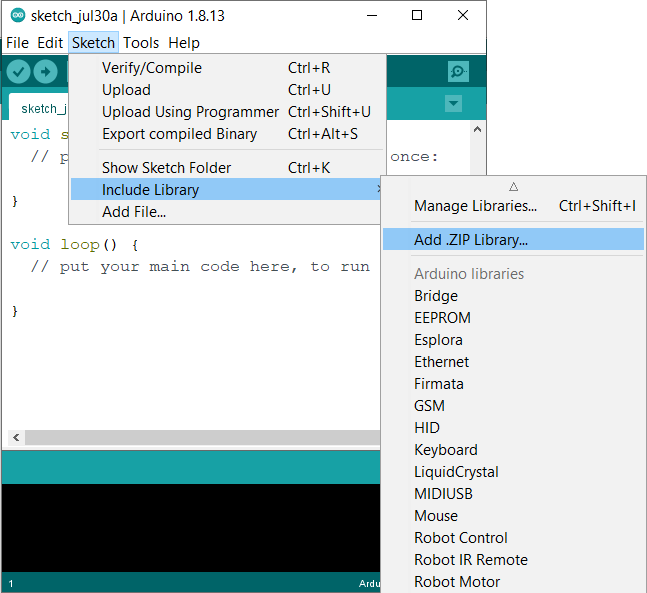
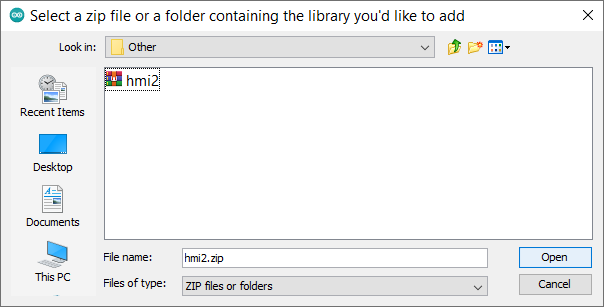
Install the Arduino library

  1. Open the Arduino IDE in your computer.
  2. Open the option "Add .ZIP Library..." from Sketch > Include Library menu.
  3. Select the "hmi2.zip" file.
Picture
Picture

HMI2 Library Functions

  • void init(HardwareSerial mySerial): Initializes the library, used when the physical serial pins on the board is been used to communicate with the Bluetooth module.
  • void init(SoftwareSerial mySerial): Initializes the library, used when any digital pin on the board is been used to communicate with the Bluetooth module.
  • void init(IPAddress server, int lanMemoryBank): Initializes the library, used whit an Ethernet shield/module, or for the ESP8266 and ESP32. The lanMemoryBank is the app memory bank which the Arduino board will be sending and receiving data.
  • void update(): Manages the connection between the Arduino board and the app, can be declared in any place of the code, if the code is inside a loop that ends whit the change of a specific variable this variable must be declared inside that loop.
  • boolean getBoolean(int word, int bit) -  boolean getBFileBit(int word, int bit): Returns the boolean value of the specific bit location of the B File.
  • void setBoolean(int word, int bit, boolean value) - void setBFileBit(int word, int bit, boolean value): Sets a boolean value to the specific bit location of the B File.
  • uint16_t getInt(int word) - uint16_t getNFile(int word): Returns an uint16_t value of the specific word of the N File.
  • void setInt(int word, uint16_t value) - void setNFile(int word, uint16_t value): Sets an uint16_t value to the specific word location of the N File.
  • uint32_t getDouble(int word) - uint32_t getDInt(int word): Returns an uint32_t value of the specific word of the D File.
  • void setDouble(int word, uint32_t value) - void setDInt(int word, uint32_t value): Sets an uint32_t value to the specific word location of the D File.
  • float getFloat(int word) - float getFFile(int word): Returns a float value of the specific word of the F File.
  • void setFloat(int word, float value) - void setFFile(int word, float value): Sets a float value to the specific word location of the F File.
  • void setDisplayID(uint8_t lcdID): Sets LCD ID of the LCD Display widget of the app.
  • void setCursor(uint8_t x, uint8_t y): Sets the position of the cursor of the LCD Display widget. x values range from 0 to 15. y = 0 upper line, y = 1 lower line.
  • void clearLine0(): Clears all the characters of the upper line of the LCD Display widget.
  • void clearLine1(): Clears all the characters of the lower line of the LCD Display widget.
  • void print(value): Prints any value type to the LCD Display widget.

How to use the App

How to use critical alarms

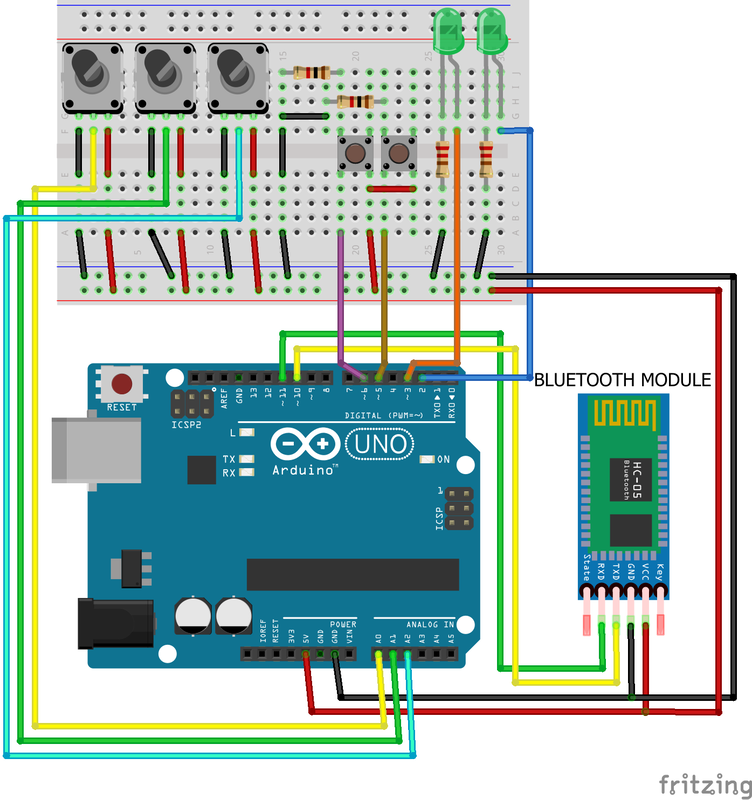
How to use the App over Bluetooth connection

Files for the example:
serialexample.hmi
File Size: 2 kb
File Type: hmi
Download File

serialexample.ino
File Size: 2 kb
File Type: ino
Download File

Picture

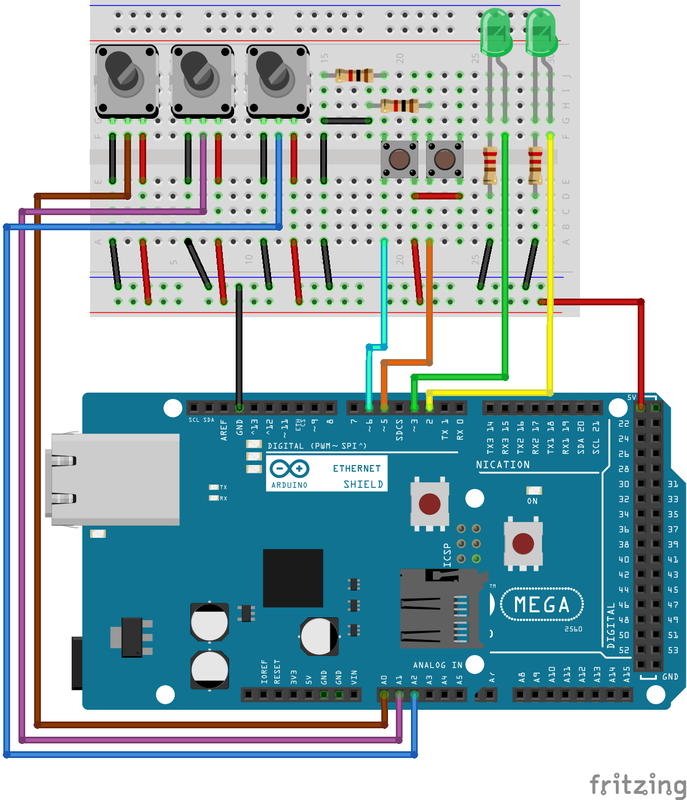
How to use the App over Ethernet connection

Files for the example:
ethernetexample.hmi
File Size: 2 kb
File Type: hmi
Download File

ethernetexample.ino
File Size: 3 kb
File Type: ino
Download File

Picture

Buttons Skins

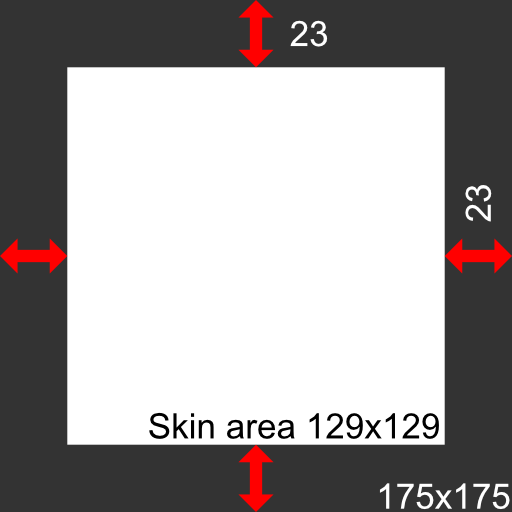
Button widgets allow to add skin on top of the button, this way more personalized designs can be made. The skins are 175x175 .png files that are located at the HMI CP Data\Skins folder.
Picture

More than one device

​This version of HMI allows to connect from 1 to 6 devices at the same time. More devices, more system resources. If the Android device doesn't have enough resources the app may crash.

Arduino Boards

The app is compatible with seven development boards:
  • Arduino UNO - Arduino NANO - Arduino Leonardo 
    • B File: 0 - 20 (B:0 - B:20)
    • N File: 0 - 20 (N:0 - N:20)
    • D File: 0 - 20 (D:0 - D:20)
    • F File: 0 - 20 (F:0 - F:20)
  • Arduino MEGA 2560
    • B File: 0 - 60 (B:0 - B:60)
    • N File: 0 - 50 (N:0 - N:50)
    • D File: 0 - 50 (D:0 - D:50)
    • F File: 0 - 50 (F:0 - F:50)
  • Arduino Due - ESP8266 - EPS32
    • B File: 0 - 60 (B:0 - B:60)
    • N File: 0 - 50 (N:0 - N:50)
    • D File: 0 - 50 (D:0 - D:50)
    • F File: 0 - 50 (F:0 - F:50)​

Arduino templates

template_bluetooth_hardware_serial.ino
File Size: 0 kb
File Type: ino
Download File

template_ethernet.ino
File Size: 0 kb
File Type: ino
Download File

template_bluetooth_software_serial.ino
File Size: 0 kb
File Type: ino
Download File

template_esp32_esp8266.ino
File Size: 0 kb
File Type: ino
Download File

Picture

​© 2020 Sergio Daniel Castañeda N . All rights reserved.  |  Privacy Policy
Powered by Create your own unique website with customizable templates.
  • Home
  • Downloads
  • MORE APPS
  • app-ads